
Your courts, tournaments and sponsors in one app.
See every court from the Club hub, let the tablet on each court keep score, and let Club TV show live matches and your sponsors. Set up your club in the app, then manage it from your computer too; contact us for packages and a quote.
The club screens in the app
A day at the club, in real screens.
These are the app’s current screens; the club, players and sponsors are examples.
-
1
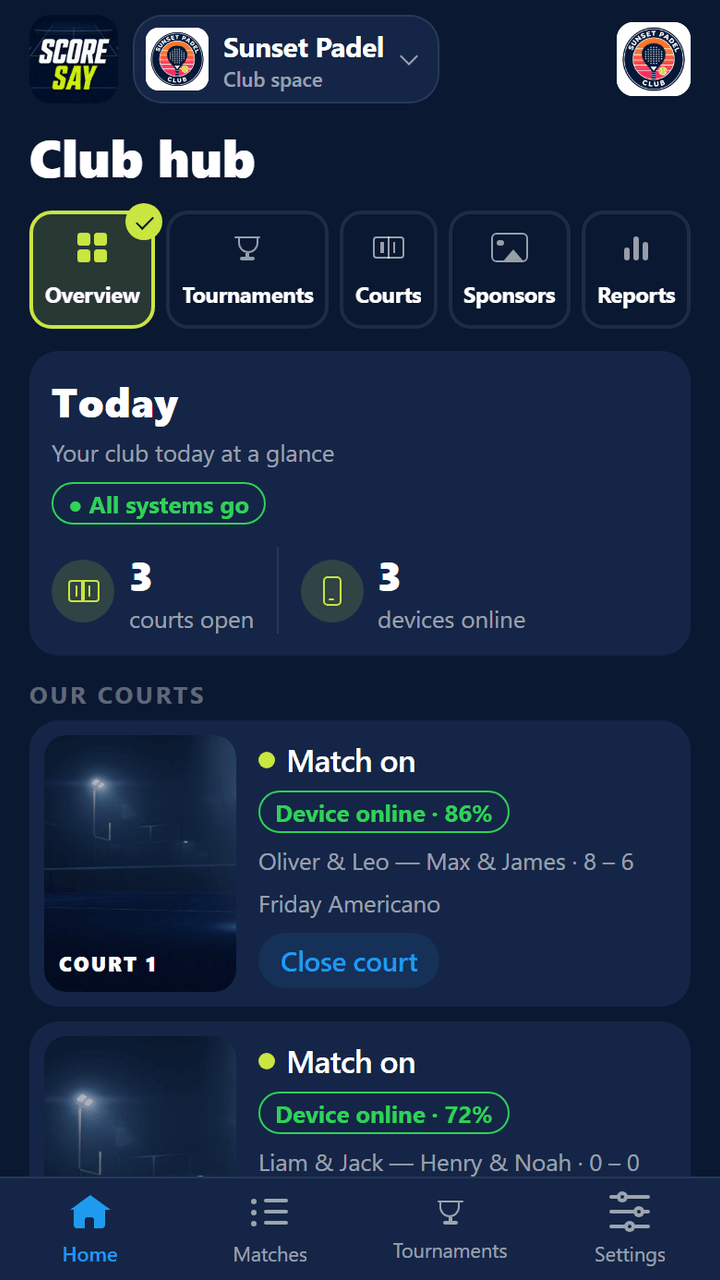
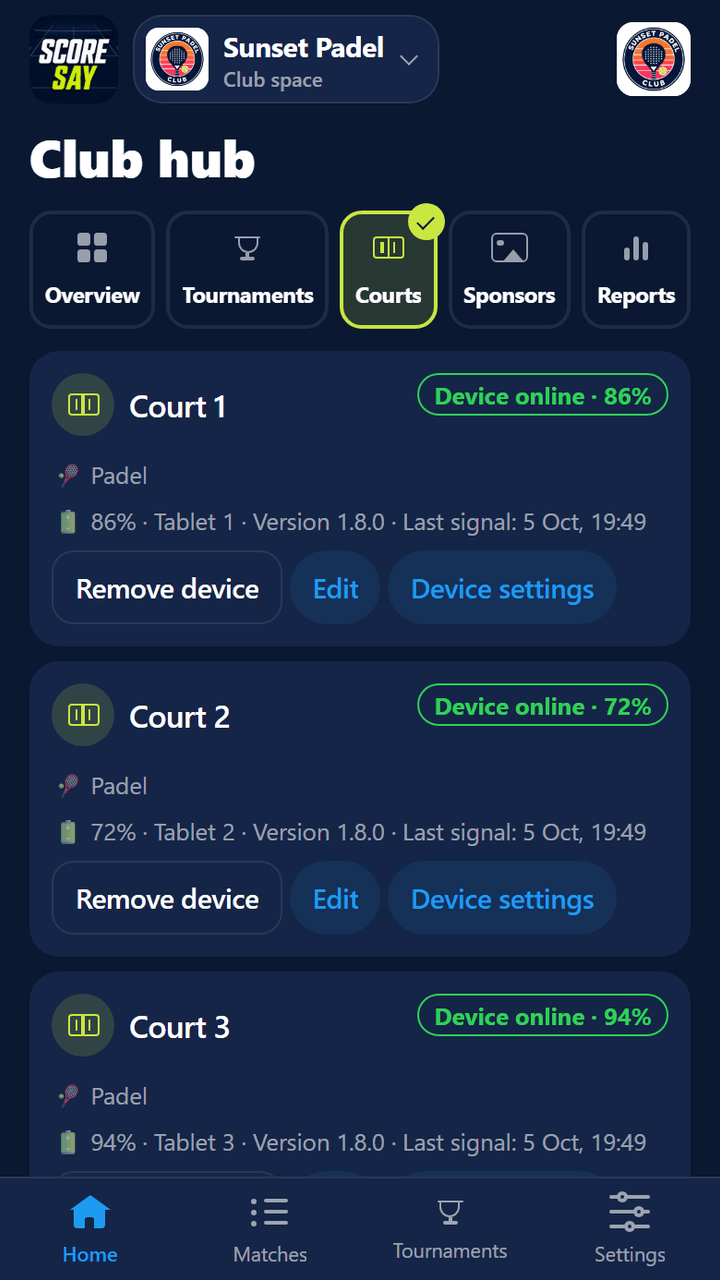
Club hub: every court at a glance
Which court has a match, which is free, which is closed, and which court’s device is connected. Court scores arrive instantly.
- ✓ Per court: “Call the players”, “Skip this match”, “Open / close court”
- ✓ Each court’s tablet: battery, version and last signal
- ✓ Court name and sport (padel, tennis, pickleball, padbol) are set per court
-
2
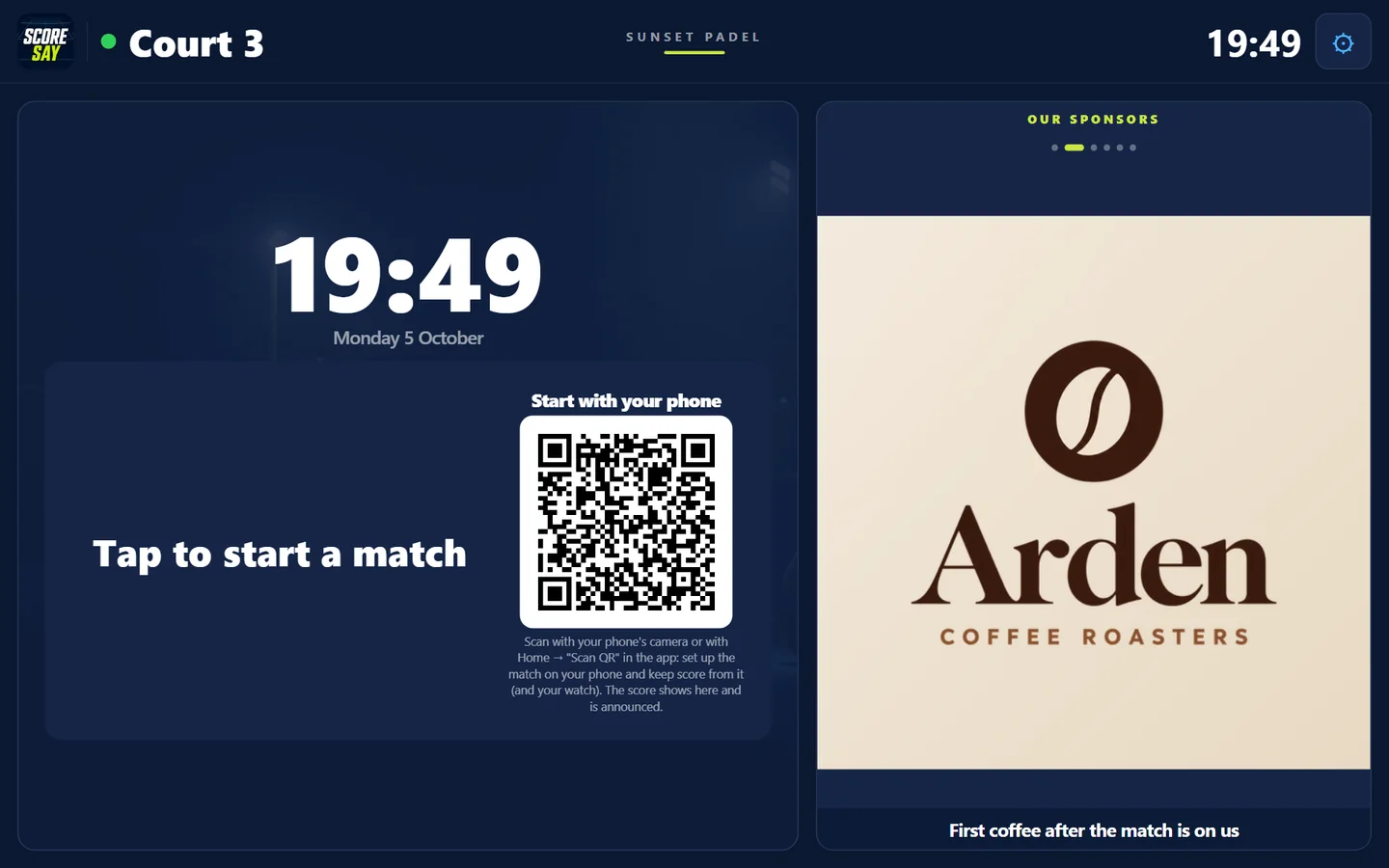
A tablet on every court: the court screen
The tablet is paired to its court once, with a QR code on the manager’s phone. While the court is free it rotates your sponsors; when players arrive they tap the screen to start a match, or scan the QR code and keep score on their own phone.
- ✓ Score is entered by tapping the screen or with a Bluetooth remote
- ✓ The score is read out after every point
- ✓ If the match is kept on a phone, the tablet shows the score live
- ✓ Screen pinning (Android) and a staff PIN: players can’t get into the settings
-
3
Club TV: an address you type once
Type scoresay.com/tv/yourclub once into the browser of your reception or café screen. It finds the club’s running tournament by itself; with no tournament it shows the courts and your sponsors.
- ✓ Live courts, standings, bracket, next match and results take turns
- ✓ The called match at the top; sponsors in a scrolling strip at the bottom
- ✓ “Follow live” QR code: spectators follow the match on their phone
- ✓ Landscape or portrait-mounted screens
-
4
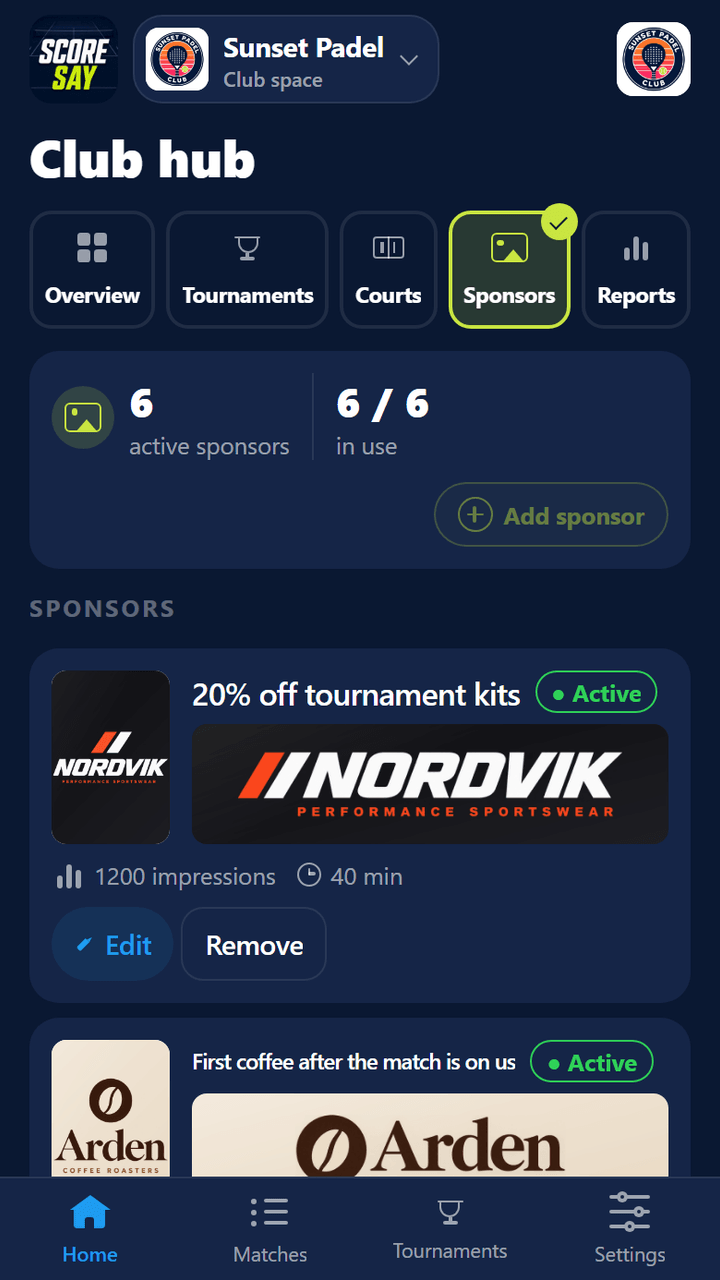
Sponsors: an empty court, a working screen
While a court is free, the tablet and Club TV show your sponsors; during a tournament they also rotate on players’ phones and on the board. The club finds the sponsor and uploads the image from a phone.
- ✓ Two images per sponsor: court screen (square) and banner
- ✓ Impressions and on-screen time for every sponsor
- ✓ Sponsor slots depend on your package (table below)
-
5
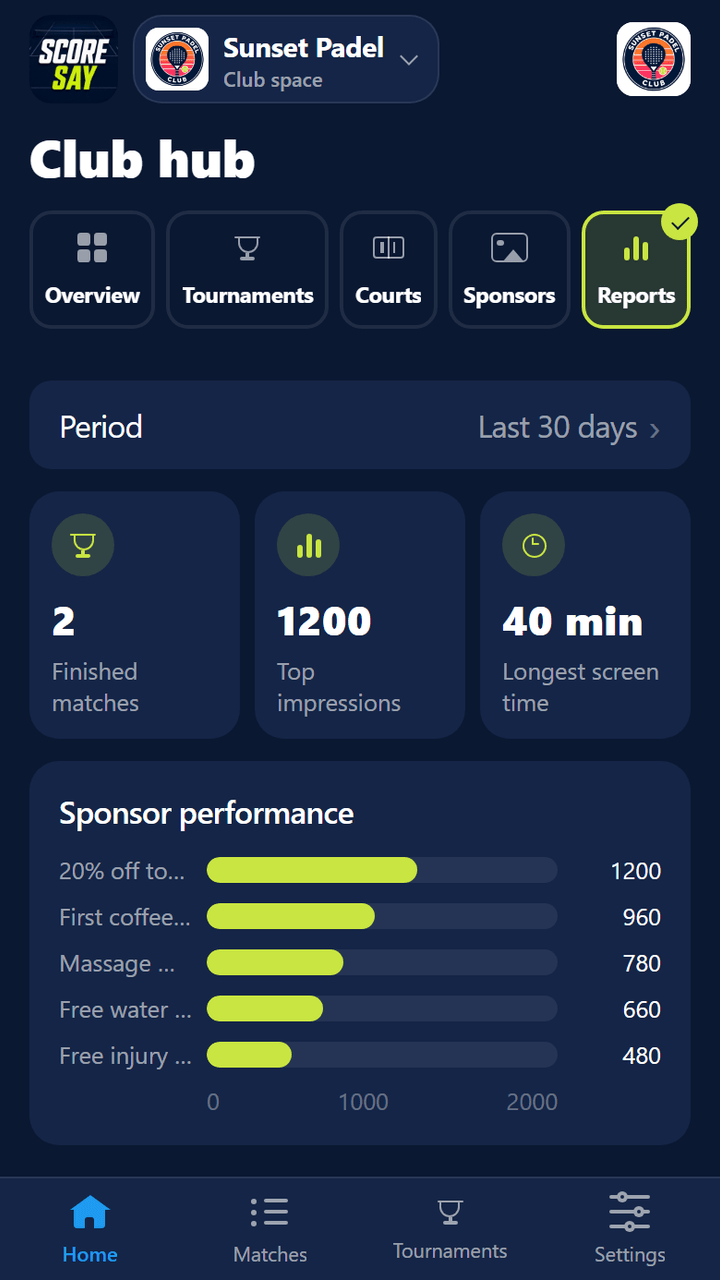
Reports: numbers you can show a sponsor
Last 7, 30 or 90 days: finished matches and impressions per sponsor. Share the report as a PDF with one tap; CSV is available too.
-
6
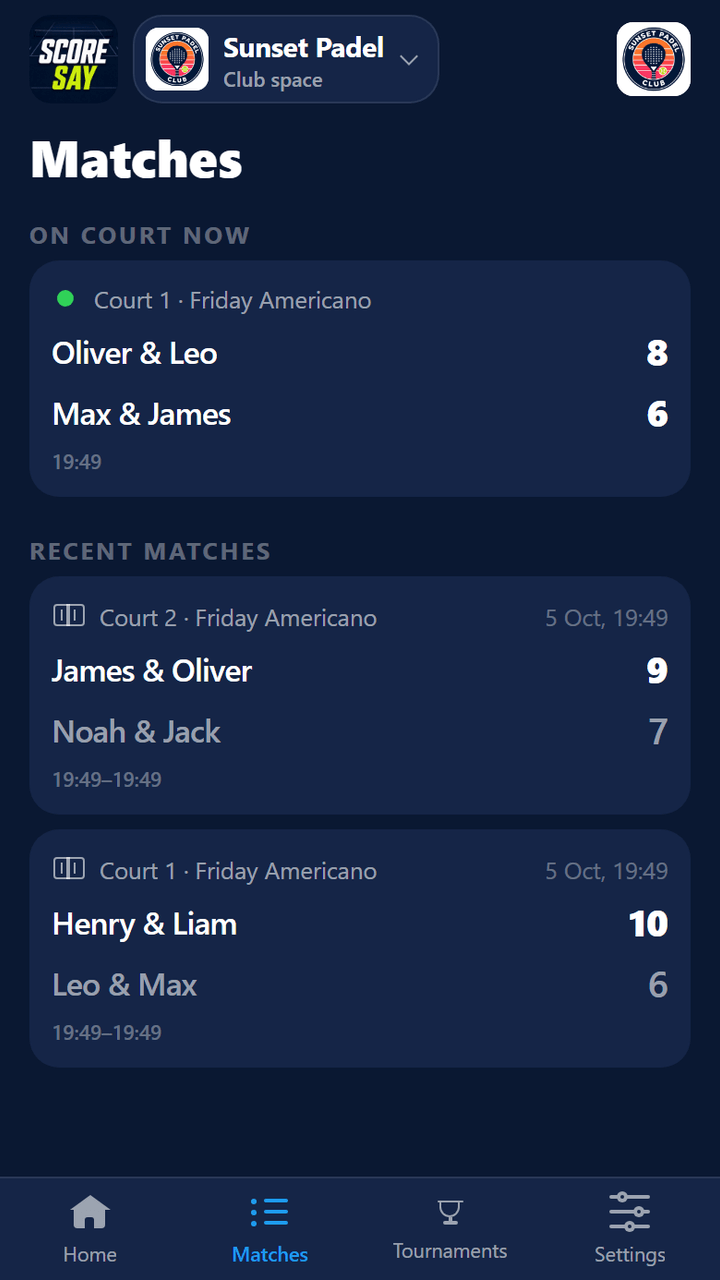
Matches: every match played at the club
What’s on court right now and finished matches in one list: tournament matches, free matches started on a tablet and matches kept on a phone. With court, time and score.
Club tournaments
Set up the tournament, the courts run themselves.
Formats
Americano, Mexicano, Team Americano and Team Mexicano; on the knockout side, single elimination, group stage + knockout and league.
Courts pick up matches
You choose which of the club’s courts the tournament uses; those courts’ tablets open the matches themselves and keep score on court.
Next match as courts free up
If you like, nobody waits for the round: when a court frees up, the next match goes to that court. You can set a rest time between matches.
Sign-up link
Players sign up themselves from a link; once the draw is full they go on the waiting list. The player list can also be imported from text or a photo.
Packages
A package for your number of courts.
A court screen on every court, Club TV at reception. Unlimited tournaments per month.
| Club Duo | Club Trio | Club Arena | Club Arena+ | |
|---|---|---|---|---|
| Courts (court screen on each) | 2 | 3 | 4 | 5–32 |
| Reception / café board screen | 1 | 1 | 1 | 2 |
| Tournament players | 32 | 64 | 64 | 64 |
| Tournaments at once | 2 | 3 | 5 | 10 |
| Sponsor slots (court screen + banner) | 3 | 4 | 6 | 16 |
| Sponsor and court report (PDF, CSV) | ✓ | ✓ | ✓ | ✓ |
You can set up your club in the app for free and start with one court; the sponsor showcase and Club TV come with the club packages. Contact us for packages and a quote.
Hardware
Hardware that fits your club.
Our software works with tablets, LED screens and TVs. The court screen runs on an Android tablet; Club TV runs on any screen with a browser — smart TV, LED screen, Chromecast, TV box or over HDMI. A Bluetooth remote and speaker are optional.
Hardware is not part of this offer; hardware requests are handled separately.
FAQ
Common questions
Do we need internet?
Yes. The court tablets and Club TV receive matches, scores and sponsors over the club’s Wi-Fi; the venue needs Wi-Fi that covers the courts.
Which tablet should we use?
We recommend an Android tablet: screen pinning (so players can’t leave the app) works on Android. The tablet is connected to its court with a QR code on the manager’s phone; no account login is needed on it.
What screen does Club TV need?
Any screen that can open a browser: a smart TV, an LED screen, or a Chromecast, TV box or computer connected over HDMI. If the screen hangs in portrait, the picture can be rotated.
Is finding sponsors up to the club?
Yes; the club knows its community better than we do. We provide the screens, the image upload flow and the impressions report. The first sponsors are usually businesses the club already works with: a café, a sports shop, a physio.
Can we add courts later?
Yes. Courts are added from the Club hub up to your package’s court count; for more courts, your package is upgraded.
Can we manage it from a computer?
Yes. Every club task from the app is also in the web panel: courts and tablets, sponsors, team, reports and booking integration. Invite your team by email; everyone signs in with their own account. Sign in: Club login.
Quote
Let us prepare a quote for your club.
Leave your details and we’ll plan the package for your number of courts together. A phone number or an email is enough.